
Download Salling Clicker – media control, Bluetooth, WiFi, remote control, computer control, smartphone, portable device, PC control, remote access
Overview
Salling Clicker is a productivity-focused mobile application designed to transform smartphones and portable devices into remote control interfaces for desktop and laptop computers. By enabling seamless interaction with a PC from a distance, the app addresses the common challenge of limited mobility during media playback, presentations, or routine computer tasks. It is particularly beneficial for users who wish to manage their computer without being physically tethered to the desk—ideal for home entertainment setups, office presentations, or multitasking environments.
The app supports a wide range of devices and applications, including media players like Windows Media Player and iTunes, allowing users to control playback directly from their mobile device. Its ability to leverage both Bluetooth and WiFi connectivity ensures stable performance across different settings, whether at home or in a mobile workspace. Salling Clicker is developed by Salling Software, a company with a long-standing presence in utility and remote control tools, evidenced by its release date in 2007.
Real-world use cases include managing music playlists while relaxing on a couch, presenting slideshows without needing to return to the computer, or securing a workstation automatically when the device moves out of range. The app enhances the usability of computers by introducing a layer of convenience, automation, and security, making it a valuable addition to the digital ecosystem for productivity and entertainment users alike.
Key Features & Functionality
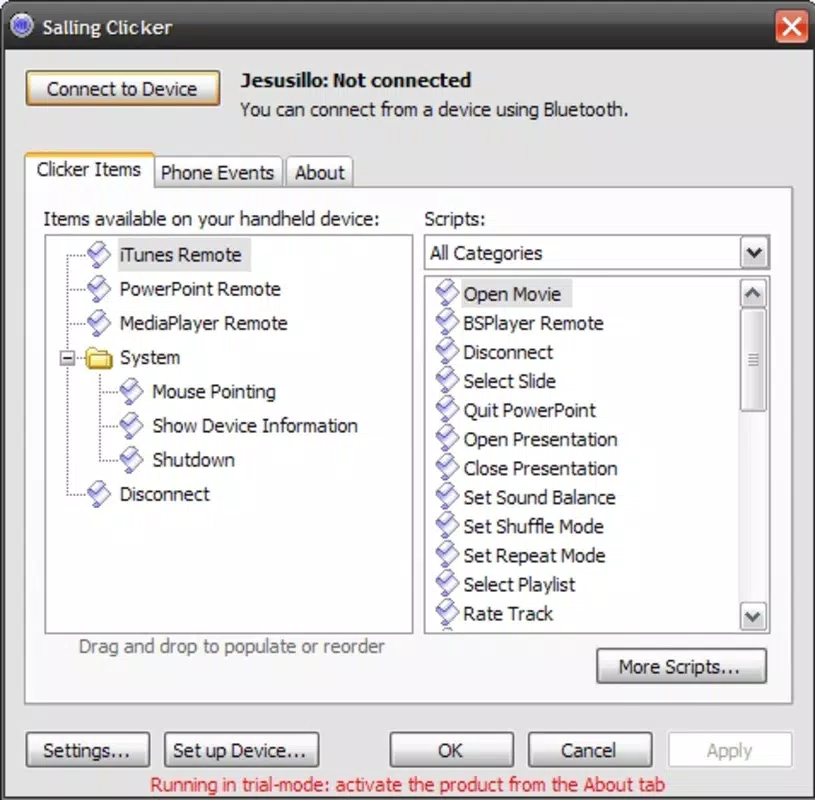
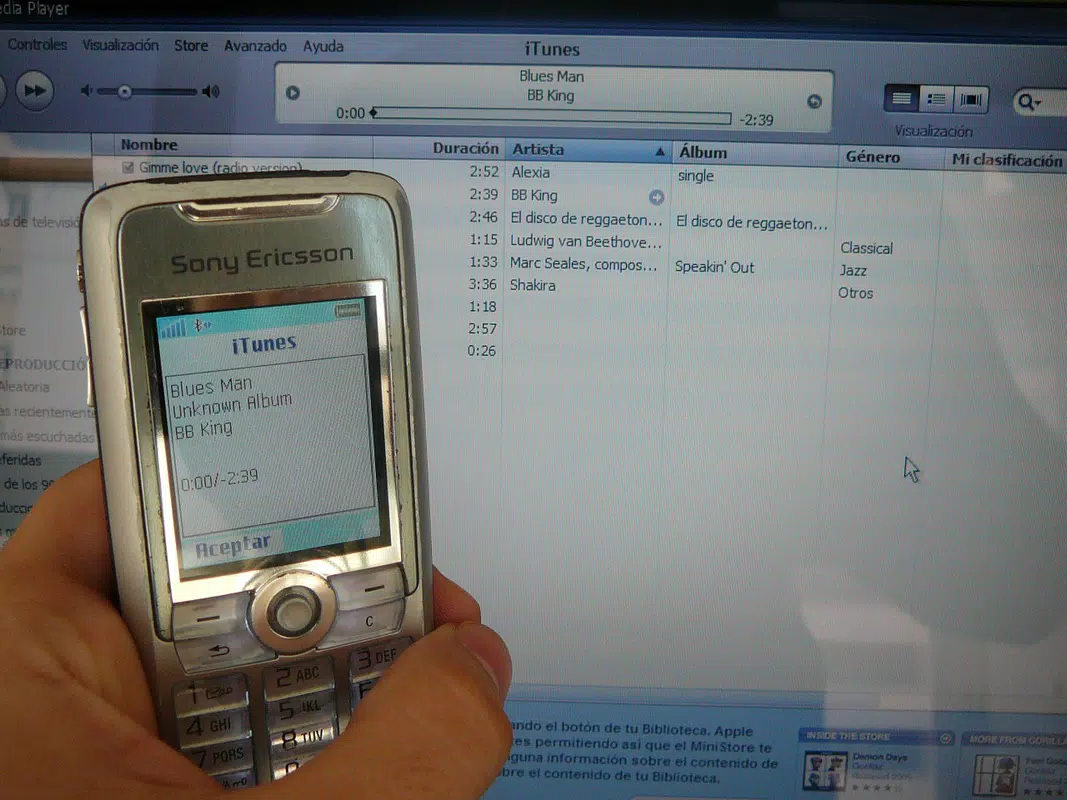
- Media Control: Users can play, pause, skip, or rewind media content from supported applications such as Windows Media Player and iTunes directly from their smartphone. This feature is ideal for home entertainment, allowing seamless control of music or video playback without interrupting the viewing experience.
- Wide Compatibility: The app supports over a hundred device models, enabling users to connect a variety of smartphones and PDAs to their computer. A compatibility list is available, helping users verify if their device is supported before installation.
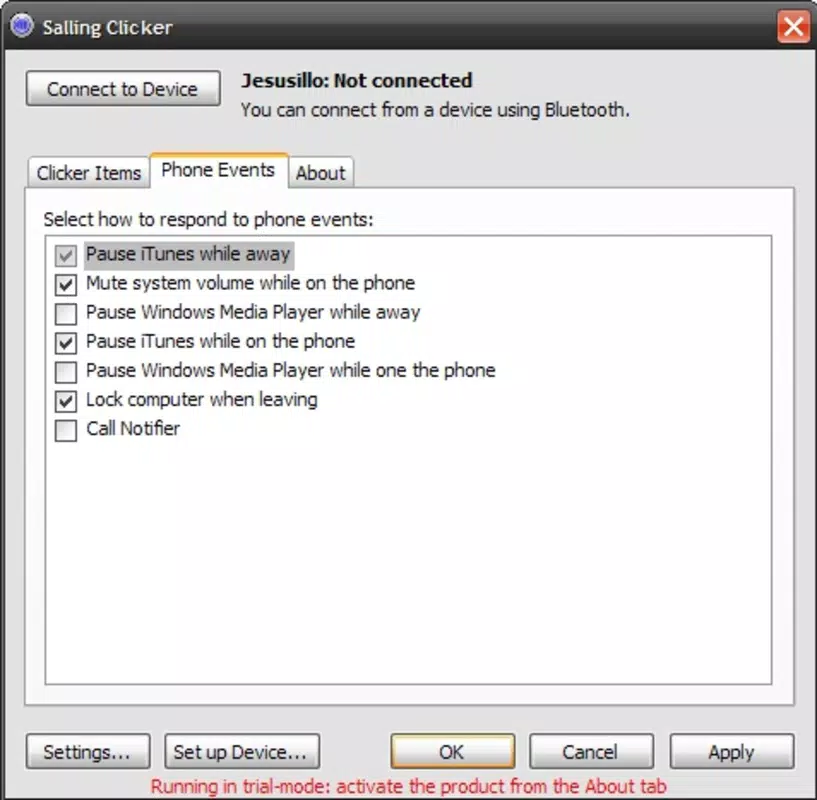
- Automatic Locking: When the connected Bluetooth device moves out of range, the app triggers an automatic lock on the computer. This security feature helps prevent unauthorized access, especially in shared or public environments.
- Flexible Connectivity: Salling Clicker uses both WiFi and Bluetooth technologies, offering users the flexibility to choose the most stable connection based on their environment. This ensures consistent performance whether at home or on the move.
- User-Friendly Interface: The app features an intuitive layout that requires minimal learning. Navigation is straightforward, making it accessible to users of all technical skill levels, from beginners to advanced users.
For example, a user can start a movie on their computer and control playback from their phone while lying on the sofa. Similarly, a presenter can advance slides during a talk without needing to return to the computer. These practical applications highlight the app’s value in enhancing both comfort and efficiency.
Interface, UX & Performance
The user interface of Salling Clicker is designed with simplicity and functionality in mind. It features a clean, minimal layout with clearly labeled controls for media playback, navigation, and system functions. The visual style is consistent with standard productivity apps, focusing on usability over ornamental design.
Navigating through the app is intuitive, with primary functions accessible from the home screen. Users can quickly switch between media controls, connection settings, and security options without confusion. The responsiveness of the interface is consistent with the app’s lightweight nature, contributing to a smooth user experience.
Although the developer did not list formal performance metrics, the app’s file size of 4.2MB suggests a lightweight footprint, which typically correlates with efficient resource usage. The app is expected to perform well on mid-range and modern Android devices, though specific performance data was not disclosed. Stability appears to be a strength, given the app’s long-standing presence since 2007 and its continued availability on the platform.
Platform Compatibility & Technical Requirements
Salling Clicker is available exclusively on the Android platform. The current version is 3.3.2, and the app has a file size of 4.2MB, indicating a compact and efficient installation. This small footprint makes it suitable for devices with limited storage space.
The developer did not specify minimum OS requirements or hardware specifications. However, given the app’s release date and continued support, it is likely compatible with a broad range of Android devices, including those running older versions of the operating system. Users are advised to check the official compatibility list to confirm support for their specific device model.
Pros and Cons
Pros
- Free to download and use, making it accessible to a wide audience.
- Supports both Bluetooth and WiFi for flexible connectivity.
- Offers automatic computer locking for enhanced security.
- Intuitive interface suitable for users of all experience levels.
- Compatible with over a hundred device models, ensuring broad accessibility.
Cons
- Developer did not provide detailed technical requirements or OS compatibility information.
- Specific performance benchmarks or device optimization details were not listed.
- App availability is limited to Android, with no information on iOS or other platforms.
- Functionality is tied to computer connectivity, limiting standalone use.
- Outdated release date may raise concerns about long-term support or updates.
FAQ
Is Salling Clicker safe to download and install?
Yes, Salling Clicker is a free mobile app developed by Salling Software. It does not require excessive permissions and operates within standard Android security protocols. Users are advised to download it from official sources to ensure authenticity.
Can I use Salling Clicker with my iPhone or iPad?
The developer did not provide information on iOS compatibility. The app is currently available only on Android. Users of Apple devices should check the official website for any future updates.
Does Salling Clicker require an internet connection?
While the app uses WiFi for connectivity, it does not require an active internet connection once paired with the computer. The connection is local, relying on the device’s network or Bluetooth signal.
How does the automatic locking feature work?
When the connected Bluetooth device moves out of range, the app triggers a system lock on the computer. This helps protect data by preventing unauthorized access when the user is away.
Is there a limit to the number of devices I can connect?
The developer did not specify a limit on the number of connected devices. Users can connect one primary device at a time, but additional connections may depend on the computer’s configuration and the app’s settings.
Final Thoughts
Salling Clicker remains a practical and efficient tool for users seeking to enhance their computer interaction through mobile devices. Its core strengths—media control, automatic security locking, and multi-protocol connectivity—deliver real value in both home and professional environments. The app’s long history and free availability underscore its reliability and continued relevance.
While it lacks detailed technical documentation and platform expansion, its straightforward design and proven functionality make it a worthwhile choice for Android users who value convenience and control. Whether managing a home media center or securing a workstation, Salling Clicker provides a seamless bridge between smartphone and PC.
Download Salling Clicker now


